
Progress Tracker App for Coaches: What to Compare

Coachful
You're ten minutes before a session, hunting through last week's notes, a spreadsheet tab and three messages to answer one simple question from your client. "Am I getting anywhere?" She logged something most days. You both feel the work matters. But neither of you can point to what changed, and that hesitation is exactly what a progress tracker app should remove.
The doubt underneath is rarely about software. You're asking whether another tool will make clients feel watched, create more admin for you, or turn nuanced change into a streak you'll spend sessions apologising for. Judge every option below by two tests. Does it show meaningful change, not just app activity? And can a client pause, miss a week and return without shame?
Progress Tracker App Options at a Glance
| Option type | Goal and milestone tracking | Client visibility | Reporting | Session and payment link |
|---|---|---|---|---|
| Spreadsheet or shared document | Manual rows and colour codes | None unless shared by hand | Built by hand each month | None |
| Generic habit or goal app | Streaks and personal goals | Usually single user | Basic streak charts | None |
| Dedicated coaching platform (Coachful) | Goals, milestones, habits and check-ins | Client app carries the coach's branding | Engagement and outcome dashboards | Sessions, payments and messages on one client |
Where Each Option Breaks
A spreadsheet is free, flexible and honest at small scale. A solo life coach with eight active clients can colour-code confidence ratings after each session and send a monthly summary by hand. The cost is your time, and it grows gradually. You'll copy the same milestone into a calendar invite, an invoice note and an email because nothing connects them.
A generic habit app does one job well. It gives a client a daily tap and a satisfying streak for, say, a morning planning routine. What it doesn't do is show you that streak beside the session where she committed to it. You're still asking, "How did the app go?" instead of opening the record together.
A dedicated coaching platform connects goals, check-ins, sessions and messages around one client. That matters once progress data has to travel. Say you're running a 12-person cohort. Within a month you'll be chasing twelve separate check-in threads unless milestones, group messages and payments sit in one place.
Rule of thumb: If progress data must travel between sessions, billing and the client's own view, a dedicated platform removes the most copying.
If you're under ten clients and never share progress between sessions, start with the spreadsheet row and read the pricing section before spending anything. If you run cohorts, sponsor reporting or multiple programs, skip to your matching case near the end. Everyone in between should score the six criteria next, because that's where "good enough for now" usually reveals its hidden hourly cost.
Six Criteria That Separate Coaching Trackers
Score each question 0, 1 or 2. Zero means absent, one means there's a workaround, two means it's built in. You're aiming for a total out of 12.
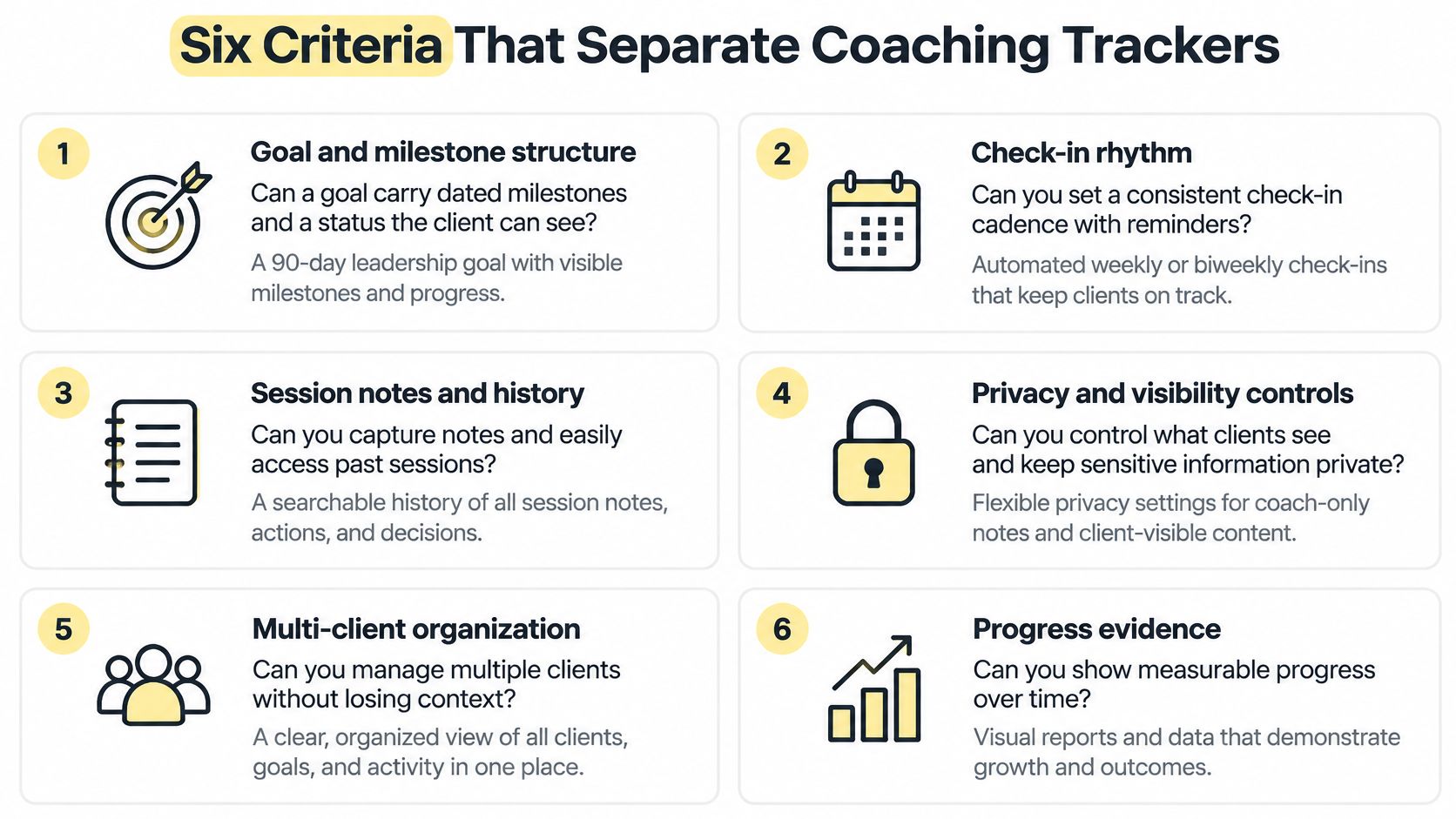
- Can a goal carry dated milestones and a visible status? Picture a 90-day leadership goal with three checkpoints, delegation in month one, a difficult conversation in month two, a team review in month three. If milestones live only in your notes, the client never sees the arc.
- Who sees what? Check whether the client can see her agreed goals without seeing your private session notes. If visibility is all or nothing, you'll censor your notes or overshare. Neither helps.
- Can you export progress for someone else? A sponsor, an employer or a credential log needs a clean summary, not screenshots of streaks.
- Does a check-in attach to the session it followed? Without that link, you can't tell whether Tuesday's insight caused Thursday's action. You're guessing at cause and effect.
- Do calendar, billing and messages connect? Every disconnected tool means double entry. Pilots removed that kind of repeated manual checking long ago, which is why checklist habits for student pilots make a useful model. Build the check once, then follow it instead of recreating it weekly.
- What does it cost per coach and per client as you grow? A flat fee that feels steep at six clients can be cheap at sixty. A per-client fee inverts that maths.
The Objection You're Probably Thinking
"My clients use a notebook and it works." It might. Test it instead of debating it. Track one notebook client in a tool for two weeks and count how many updates you had to repeat, ask for twice or reconstruct before a session. That count is your answer.
Ask one more question of every criterion. Does this feature show change, or only activity? A tracker can score two for check-ins while telling you nothing about whether confidence, revenue or leadership behaviour moved. If your total lands below 8, you need a clear reason to keep that option. Habit and sunk setup time aren't reasons.
Client Visibility and Privacy Controls Compared
You're thinking it, so say it plainly. "If I put my clients in a tracker, won't they feel monitored?" Some will, if you design it badly. The fix isn't less tracking. It's three distinct visibility levels, set deliberately.
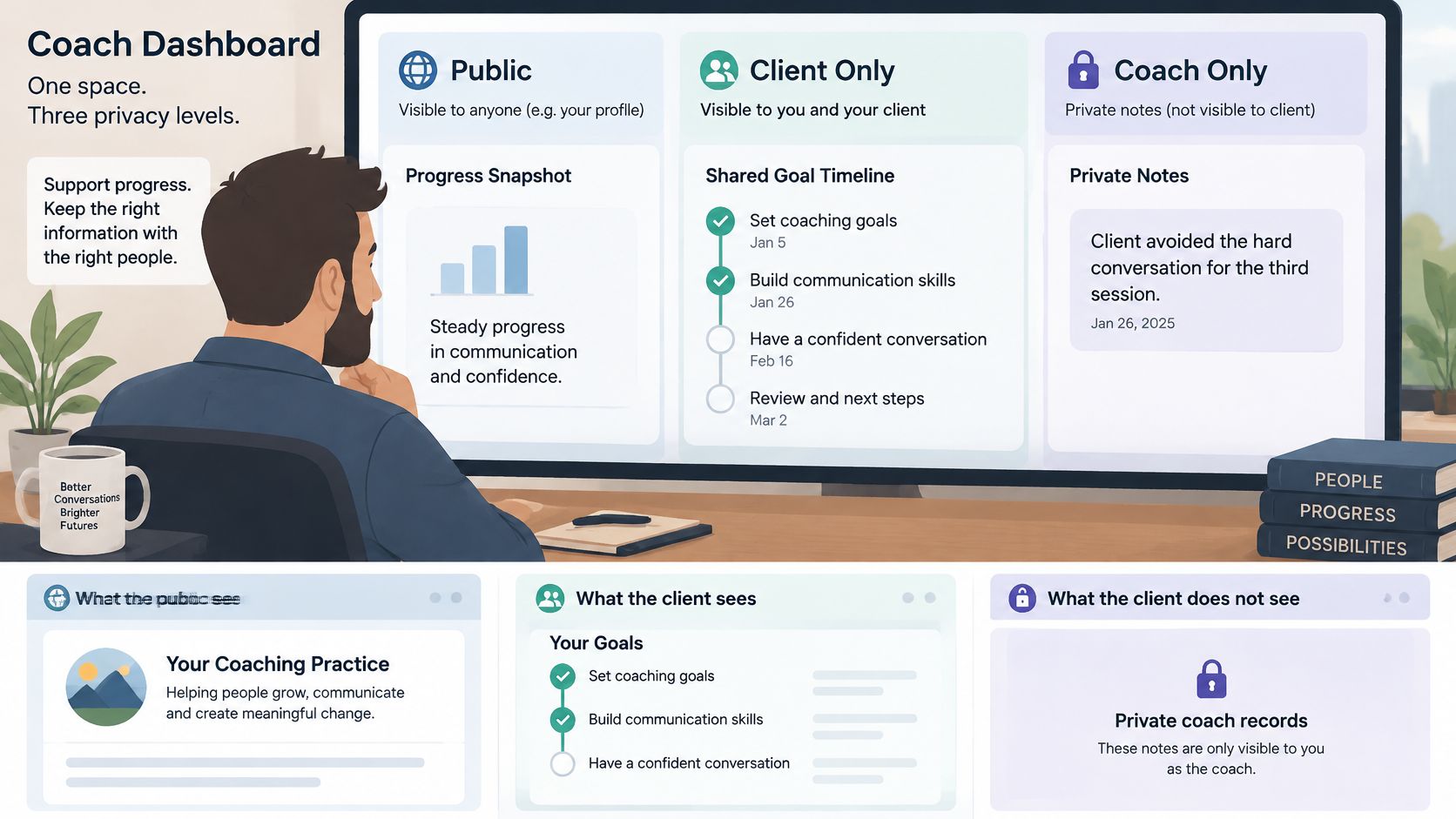
Coach-only notes hold what you'd never paste into a client email. "Client avoided the hard conversation for the third session" is useful clinical judgement and a relationship problem if she reads it cold. Client-visible goals are the opposite. The agreed goal, the next milestone and her own check-ins appear in her app, in her words where possible. Cohort-visible progress sits between them. A group sees that milestones were completed this week, without individual scores, ratings or rankings that turn peers into an audience.
Why Control Matters More Than Features
Privacy isn't a settings page. It decides whether clients stay. A 2025 systematic review and meta-analysis of research on goals describes a digital eating-disorder intervention where only 23% of participants still used the app at four weeks, with privacy concerns among the reported barriers alongside accessibility, usability, time and cost. Coaching clients aren't patients in that study, but the mechanism is familiar. People stop logging when they don't know who sees the log.
Before you buy anything, ask five questions. Can a client hide a goal from a cohort view? Can she pause without losing history? Can she export her own data? Can she choose her notification settings rather than accepting your reminder schedule? And can individual results stay out of group dashboards entirely? We set out the same expectations in our guide to who can see your coaching data, because clients should be able to read the answer without asking you mid-session.
In our setup, clients use an iOS and Android app carrying your branding, while our Coaching CRM keeps intake, goals, habits, check-ins, sessions, private notes, tasks and messages around one client. That separation is the point. She sees her progress. You keep your working notes.
For one-to-one work, client-visible goals plus coach-only notes cover most needs. Add the cohort level only when peer momentum serves the program, and keep scores out of it.
Measuring Change and Designing for Missed Weeks
Start with the change the client agreed to, not the log. Take a 90-day leadership goal. She rates "I address problems directly" at baseline in week one, then rates it again at day 90. That pair of numbers, plus one piece of real-world evidence per milestone, tells you more than ninety check-ins.
Now compare it with activity. A client who checks in every day for a month while that rating stays flat is busy, not progressing. A 2025 digital-health framework in Frontiers in Digital Health reports median 90-day retention below 10% across commercial health apps and only a weak relationship between time spent in an app and clinical change. Different field, same warning. More logging doesn't equal better coaching.
Record the rating in your own session check-in so the trend appears without asking her to log more. Then ask the question the app can't. "What changed at work this month?" One concrete answer beats a perfect streak.
Treat streaks, reminders and rewards as options, not defaults. They steady some clients and shame others into a quiet exit after one missed week. Design the recovery instead. Let her pause without losing history, offer a catch-up check-in rather than a broken-streak counter, and tie any reward to an agreed milestone. Match the mechanism to the goal. Nearby peer support suits physical-activity goals, while rewards suit screen-time and digital-wellbeing goals. One streak system for every client ignores that difference.
Benchmarks That Show Whether Progress Is Real
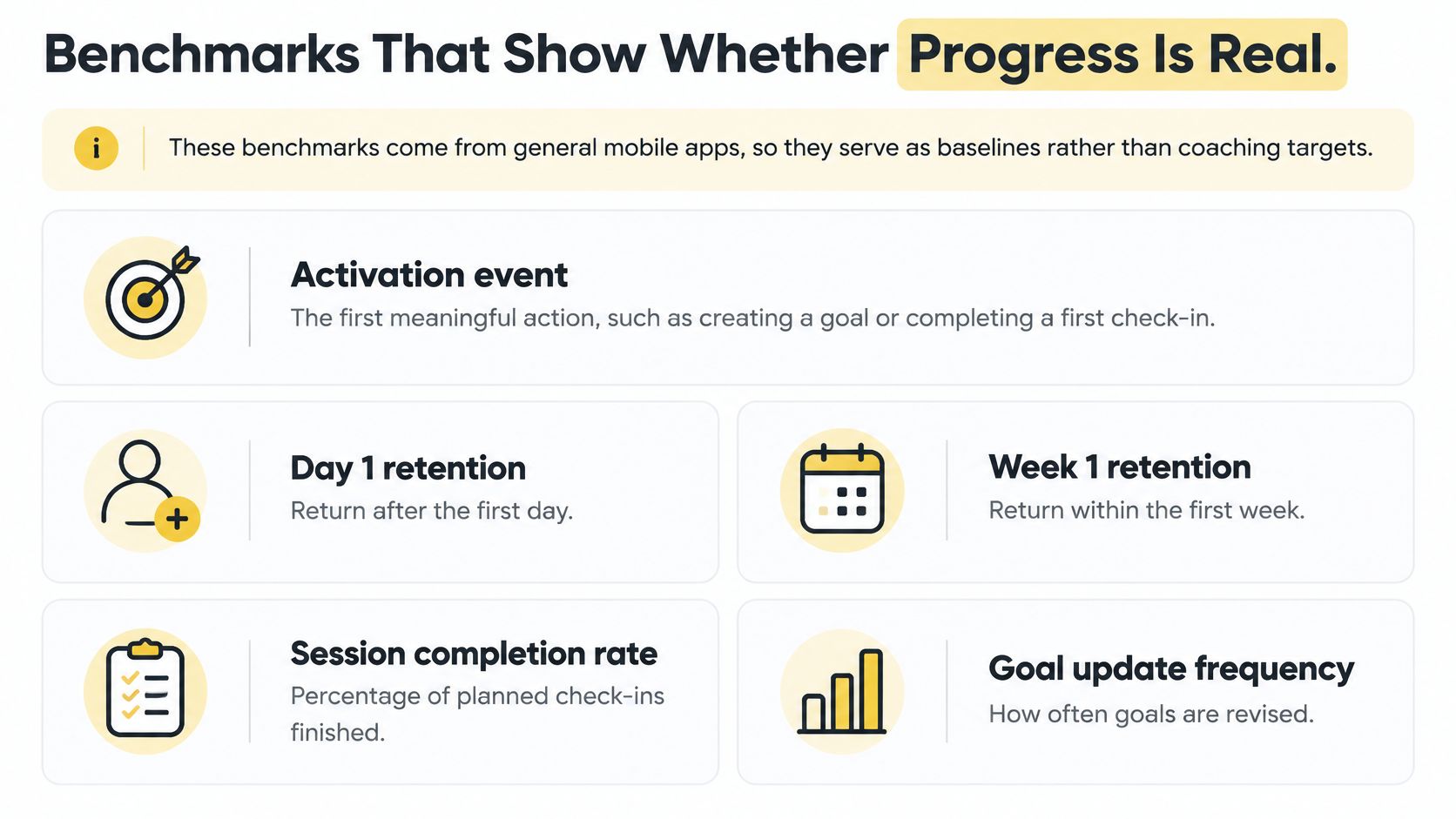
These benchmarks come from general mobile apps, so they serve as baselines rather than coaching targets. Use them to spot a broken onboarding flow, not to judge a client. Start with the activation event, the first meaningful action such as creating a first goal, completing a check-in or submitting an assignment. If a new client can't do that unaided, nothing downstream matters.
| Metric | Benchmark | What it tells a coach |
|---|---|---|
| Median time to first meaningful action | Within about 60 seconds | Whether clients can log a first goal or check-in without help |
| Day-1 retention | Above 20% | Whether the first session brings clients back |
| Day-3 retention | About 14% | Whether the routine survives the first weekend |
| Day-7 retention | About 10% | Whether clients are still engaged after one week |
| Day-30 retention | No fixed benchmark, compare across your own cohorts | Whether progress holds beyond the first month |
| DAU/MAU stickiness | Above 20% | Whether tracking has become a daily routine |
Read the table as a funnel. The PostHog guide to mobile app metrics and KPIs gives a practical baseline of greater than 20% Day-1 retention, about 14% Day-3 retention and about 10% Day-7 retention for general mobile apps, with a DAU/MAU ratio above 20% commonly treated as healthy engagement. It also emphasises keeping the first meaningful action within about 60 seconds where possible.
Comparing Cohorts Beats Counting Opens
Say you run two cohorts of 15 clients. One gets dated milestones at intake, the other gets goals only. If the milestone cohort keeps more clients at Day-30, the milestones are doing the work. That's evidence you can act on. App opens can't tell you that, because a confused client opens an app repeatedly too.
A falling Day-7 figure usually points to onboarding, not to your coaching. Fix the first goal and the first check-in before you redesign the program.
Pair engagement numbers with an outcome a client defines. Health coaches sometimes anchor that outcome outside the app entirely, using something like Telomyx DEXA, VO2 max and RMR testing as a baseline and retest rather than trusting step counts. The coaching equivalent is a repeated rating or a sponsor-agreed behaviour, documented in a format like our progress note template. Compare by program type, coach and onboarding path. Then you're measuring whether progress holds, not whether an icon got tapped.
Pricing Tiers and Integration Costs
Run the cost-per-hour test before you look at any pricing page. Multiply the hours a progress tracker app saves you each month by your hourly rate, then compare that figure with the monthly fee. Three hours saved at $100 an hour is $300. If the plan costs less than that and genuinely removes the three hours, it pays. If it saves forty minutes, it doesn't, however tidy the dashboard looks.
Three pricing models dominate. A flat plan suits growth because client number twenty costs you nothing extra. A per-coach seat suits small teams but punishes you for adding an associate. A per-client fee feels fair at the start and taxes your success. Our coaching platform pricing comparison lays these models against each other so you can test them at your current and planned client counts.
One Worked Example
Our Studio plan costs $199 per month when billed monthly and covers the owner plus three coaches, with unlimited clients and 1000 AI credits a month. Split across four coaches, that's about $50 per coach. A solo coach pays the full amount for seats she isn't using, which is a real argument against it at that size. Against the cost-per-hour test, $300 of saved time covers the $199. One hour saved doesn't.
We offer a 7-day free trial, which is enough to run one real client through goals and check-ins rather than clicking around a demo account. On integration, our scheduling syncs with Google, Apple/iCloud and Microsoft calendars, so sessions don't need entering twice. Check any vendor for the same, plus billing and messaging links.
Add the hidden costs everyone forgets. Migration time, client onboarding time, and the effort of exporting your data if you leave later all belong in the total. Competitor prices change, so verify current pricing before deciding. Calculate cost per coach and per client at today's numbers and at twice today's numbers. Pick the model that's still comfortable in the second column.
Which Tracker Fits Your Coaching Practice
| Coaching case | Must-have features | Option type that fits | Watch-out |
|---|---|---|---|
| Solo one-to-one life coach | Goals, check-ins and session notes | Habit app or dedicated platform | Notes and sessions need a platform |
| Group cohort or course | Milestones per cohort, group messaging, scheduled content | Dedicated coaching platform | Individual results must stay hidden from the group |
| Corporate executive coach | Confidential notes and outcome reports for a sponsor | Dedicated platform with controlled reporting | Sponsor sees only agreed outcomes |
| Credential-track coach | Coaching hours log for paid and pro bono hours | Platform with an hours log | Log every session from the first one |
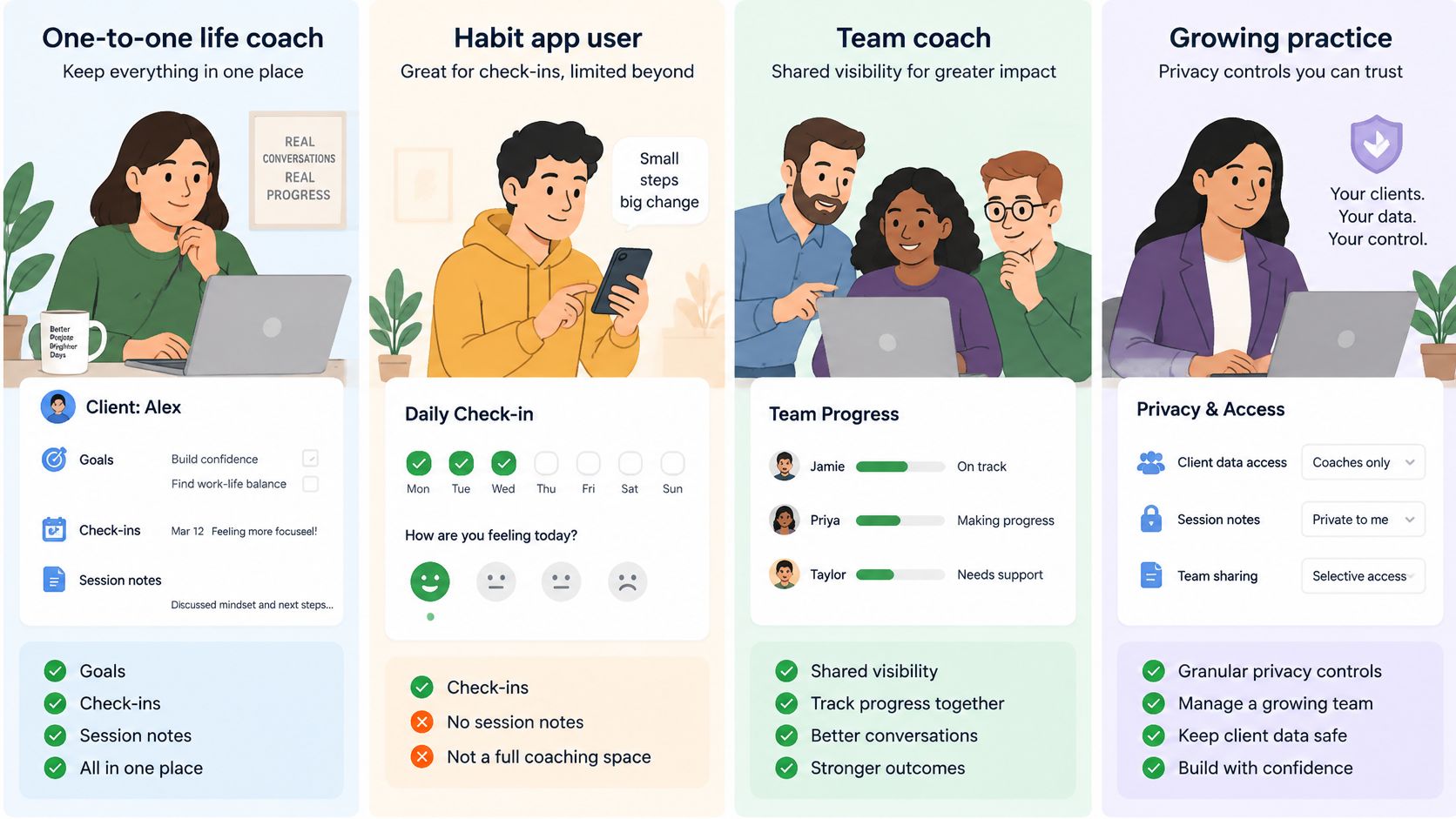
A solo one-to-one life coach needs goals, check-ins and session notes in one place. A habit app covers the check-in tap, and that's all it covers. The deciding feature is session linkage. Gym owners hit the same wall when member data lives apart from programming, which is why guides on how to implement training software at your gym stress consolidating records before adding features.
A group cohort or course lives or dies on admin you don't see. When a client completes checkout on a payment plan linked to a program, we enrol them automatically and add them to the group chat if that program has a cohort squad configured. Multiply that one manual step by every intake and you'll feel why it's the deciding feature.
An executive coach should ignore streaks entirely. Your client is a senior leader and your buyer may be her sponsor. The deciding feature is controlled reporting, agreed outcomes shared, everything else confidential.
A credential-track coach needs one essential item. Our ICF hours log tracks paid and pro bono coaching hours, and it only helps if you log from the first session rather than reconstructing a year from calendar entries.
"I'm not technical enough to set this up" is the objection underneath most delays. Don't migrate everything. Start with one program and one client group, learn the three screens you'll use, and expand only when the first group runs cleanly.
Choose Your Tracker and Test It This Week
You don't need a procurement process. You need one honest week with one real client.
- Find your row in the coaching-situations table and write down its deciding feature. That's your must-have.
- Score each shortlisted option on the six criteria, out of 12. Drop anything below 8 unless it wins on the deciding feature.
- Run the cost-per-hour test against the monthly fee, at today's client count and at double it.
- Test the winner with one real client for seven days. Did she log progress in week one? Did you stop copying data between tools? Could she pause or catch up without an apologetic message to you?
Three ways to start. Trying us free takes 5 minutes, a free trial is available, and you can build a first program offer in minutes during it. If you'd rather watch first, we offer a live demo. If you're staying with a spreadsheet, apply the same seven-day test to it and count your copying candidly.
Here's the decision rule. If clients need progress visible between sessions, and your calendar and billing should connect to that progress, start with a dedicated coaching platform. If you coach a handful of people and never share progress outside the room, a spreadsheet may still be enough, and spending money won't improve your coaching.
At the end of the test week, record one number. How many progress updates did the client make without prompting? That single figure tells you whether you bought accountability or merely another place to type.
Put one real client through a goal, two milestones and a week of check-ins, then judge the tool by whether she returned after a missed day, not by whether the dashboard looked tidy. We built Coachful to keep goals, habits, sessions, payments and private notes on one client record, with a branded client app she controls. Start the free trial today and record that one unprompted-update number at the end of the week.


